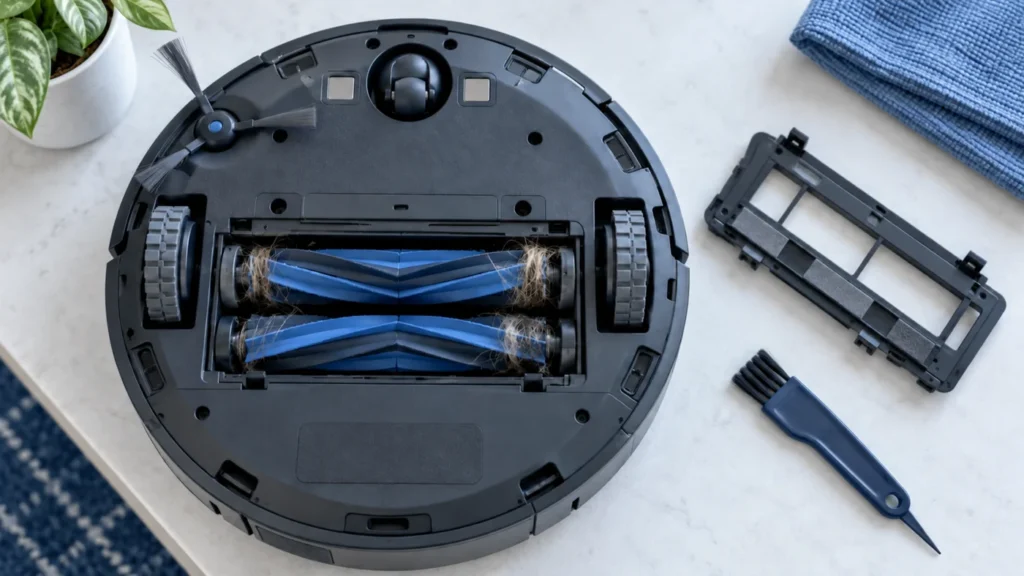
Begin with the quick checks. Stop if a step requires tools or experience you do not have.
Quick answer: If the main brushes on your Roborock S8 are not spinning, turn the robot off and remove the DuoRoller brushes. Clear hair and thread from both rollers, their removable ends, and the two brush mounting slots. Reinstall the rollers and brush cover securely, let the robot cool down, and test it on a clean hard floor.
The Roborock S8 uses two rubber main rollers to lift dirt toward the suction inlet. If either roller becomes jammed or cannot sit correctly in its mounting point, cleaning performance can drop sharply. You may notice debris left behind, an unusual rattling sound, or an Error 5 message.
Before you start
- Pause the current cleaning task and turn the robot off.
- Move it away from the charging dock.
- Place it upside down on a soft towel to protect the top cover and LiDAR housing.
- Do not test the brushes while holding the robot upside down.
- Do not pour water, oil, or cleaning spray into the brush compartment.
You normally do not need to disassemble the robot body. Begin with the removable brushes, their ends, and the brush cover.
Why the Roborock S8 main brush stops spinning
| Possible cause | Typical symptom | What to check |
|---|---|---|
| Hair or thread around a roller | Brush turns slowly, stops, or makes a clicking sound | Roller surface and both ends |
| Blocked mounting slot | Roller is difficult to turn after installation | Debris inside the left and right sockets |
| Brush installed incorrectly | Problem begins immediately after cleaning | Roller orientation and end-cap seating |
| Brush cover not locked | Rattling, uneven contact, or poor pickup | Cover tabs and both latches |
| Motor protection activated | Brush stops after working under heavy resistance | Allow the robot to cool before retesting |
| Damaged roller or drive socket | One roller repeatedly sticks or sits unevenly | Rubber fins, roller ends, and drive connection |
1. Remove both main brushes
Open the main-brush cover by pressing its release points. Lift the cover away and remove both rubber rollers. Keep them in order so you can reinstall them in their correct positions.
Inspect the space underneath the rollers. Small pieces of thread, pet hair, carpet fiber, paper, and plastic can become packed against the sides of the brush compartment.
2. Cut away wrapped hair and thread
Rotate each roller by hand and inspect the full length of the rubber fins. Remove anything wrapped around the roller, especially material pulled tightly against either end.
Use the supplied cleaning tool or small blunt-ended scissors. Work carefully to avoid cutting the rubber fins. Pull loose debris away rather than pushing it farther into the roller ends.
3. Clean the roller ends and mounting slots
This is the step most likely to be missed. A roller can look clean in the middle while hair remains tightly packed around its end.
- Inspect both ends of each rubber roller.
- Remove any detachable end pieces that are designed to come off without force.
- Pull away trapped hair, fibers, and dust.
- Check the corresponding mounting slots inside the robot.
- Wipe the area with a dry, lint-free cloth.
Do not force an end cap that does not release easily. The exact construction can vary between S8-series versions and regional models.
4. Check that both rollers turn freely
Before reinstalling them, rotate each cleaned roller by hand. It should move smoothly without a tight spot, grinding sensation, or heavy resistance.
Compare the two rollers. If one turns normally and the other remains stiff after cleaning, examine the stiff roller for a bent end, damaged rubber, or debris hidden inside its end assembly.
5. Reinstall the brushes and lock the cover
Return both rollers to their correct positions. Make sure each end sits fully inside its matching mounting point. The rollers should lie level rather than lifting at one side.
Reinstall the brush cover and press it down until its latches engage. Check that:
- the cover is flush with the bottom of the robot;
- both sides are locked;
- no hair is trapped under the cover;
- the rollers do not press against a misaligned cover edge.
An incorrectly seated cover can allow the brushes to rattle, bind, or lose contact with the floor.
6. Let the brush motor cool down
If the problem appeared during a long cleaning session or after the rollers became heavily tangled, leave the robot switched off for approximately 20–30 minutes.
The brush system may stop temporarily when resistance or motor temperature becomes too high. Cleaning the obstruction and allowing the motor to cool can restore normal operation.
7. Run a controlled test
Place the robot normally on a clean hard floor. Start a short room-cleaning cycle and allow it to travel several feet. Do not touch or lift the robot while it is running.
Use a small, safe test area with a few lightweight crumbs. If the debris is pulled into the dustbin and no brush warning returns, the rollers are probably working normally.
If Error 5 was displayed, confirm that both brush installation slots are clear. Roborock also recommends testing again with its carpet-related cleaning setting enabled after cleaning the brush obstruction.
If only one Roborock S8 roller is spinning
Remove both rollers again and compare their ends. Check whether the non-moving roller is installed in the correct position and whether its drive end is fully seated.
If the problem moves when the rollers are exchanged only where the model’s design allows correct installation, the roller itself may be damaged. If the same side continues to fail, the obstruction or fault may be inside that side’s mounting or drive mechanism.
Do not force an incompatible roller into the opposite position. Follow the orientation markings used on your specific S8 version.
When the brush should be replaced
Consider replacing a roller when you find:
- torn or heavily deformed rubber fins;
- a cracked or loose roller end;
- a roller that remains stiff after complete cleaning;
- warping that prevents the brush from sitting level;
- repeated jamming with no visible debris.
Use a replacement specified for your exact Roborock S8 model. Parts for the S8, S8+, and S8 Pro Ultra may not always be interchangeable.
When to contact Roborock support
Stop troubleshooting and contact qualified support if:
- Error 5 returns immediately after both rollers and mounting slots are cleaned;
- the brush compartment produces grinding or electrical noises;
- you notice a burning smell or unusual heat;
- the drive socket does not move or appears damaged;
- both rollers are installed correctly but never operate during cleaning.
A persistent problem with clean, correctly installed rollers can indicate a brush motor, drive mechanism, wiring, or control-board fault. Opening the robot body may affect its seals or warranty, so internal repair is best left to an authorized service provider.
Frequently asked questions
Can the Roborock S8 clean if its main brushes are not spinning?
The suction fan may still collect some loose dust, but pickup performance will be much worse, especially on carpets and with hair. Stop the robot and fix the brush problem before continuing normal cleaning.
Does Error 5 always mean the brush motor has failed?
No. Error 5 commonly appears when hair, thread, or debris restricts the main brush. Clean the rollers, their ends, and both installation slots before assuming the motor is faulty.
Should I lubricate the brush ends?
No lubricant is normally required for routine brush maintenance. Oil can attract dust and reach parts that should remain dry. Clean the removable components with a dry cloth unless the manufacturer specifically instructs otherwise.
Can I wash the rubber rollers?
Follow the cleaning instructions supplied with your exact model. If a removable roller is rinsed, it must be completely dry before reinstallation. Never introduce water into the brush compartment or drive sockets.
How often should I clean the main brushes?
Inspect them regularly and clean them more often in homes with pets, long hair, or fiber-heavy carpets. A quick inspection after several cleaning cycles can prevent tightly wrapped hair from overloading the brush drive.
Final check
In most cases, the fix is straightforward: remove both rollers, clean their ends and mounting slots, reinstall them correctly, and let the robot cool before testing. If the same warning returns with clean and freely moving rollers, the next step is professional diagnosis rather than deeper disassembly at home.
RoboFixGuide is an independent troubleshooting resource and is not affiliated with Roborock. Product names are used only to identify compatible devices.